

✨ Kicking Off the New Year with Momentum! ✨
A new year has begun, and at Raklet, we’re starting it just the way we like, by continuing to ship improvements without slowing down.
As always, these updates are shaped by your feedback and focused on making everyday community management clearer, more flexible, and more reliable.
This round of improvements brings smarter controls, usability enhancements, and small but meaningful refinements that make a real difference in daily workflows.
We’re carrying our momentum into the new year with updates designed to help growing communities stay organized, reduce manual work, and move forward with confidence. 🚀
✨ What’s New at Raklet?
We’re excited to start the year strong. Let’s take a look at what’s new.
1. Improved Signup & Application Form Consistency
We’ve aligned the Signup and Application form experiences to reduce confusion and ensure consistent membership settings.
- Membership Terms & Agreement can now be managed centrally from Membership Settings and will appear on both Signup and Application forms
- Registration fees are now defined under Membership Settings and apply regardless of which form type is used
- The application form uses a single shared form where members fill in the same information before selecting a plan
- Signup forms remain plan-specific and customizable, allowing members to choose a plan first and then answer tailored questions
These changes create a clearer, more consistent registration flow while preserving flexibility for different membership models.
2. Improved Settings Page Experience
We’ve redesigned the Settings page to make it simpler and easier to navigate.
Previously, managing settings could feel a bit overwhelming. Now, settings are clearly organized into sections such as Profile, Notifications, Privacy, and Account, making it easier to find and update what you need.
This update brings a cleaner layout and a more user-friendly experience, helping you move faster with fewer clicks.
3. Directory Sorting Options Added
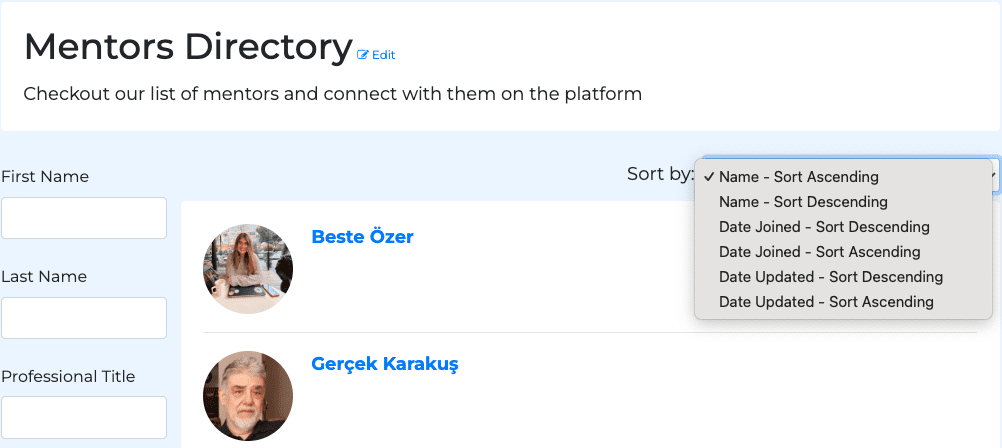
You can now sort directory items using the new Sort by dropdown. Available sorting options include:
- Name (A–Z / Z–A)
- Date Joined (newest / oldest)
- Date Updated (newest / oldest)
This makes it easier to organize and browse directory lists.
4. New Add-On: Priority Support Plan
We’ve launched a Priority Support Add-On for teams that need faster, one-on-one help.
- 2 scheduled 30-minute support calls per month
- Calls booked within 24-48 hours (weekdays)
- Live Zoom sessions with a Raklet team member
Ideal for advanced setups, integrations, and time-sensitive issues. Standard email and in-app chat support remain included in all plans.
5. Refund Improvements & Warnings for Memberships & Events
We’ve expanded refund capabilities across Raklet.
- Refunds are now supported for Events and Donations, in addition to memberships
- The Refunds report now includes both membership and event refunds
Admins now see helpful warnings when issuing refunds for memberships and events.
- For membership refunds, admins are informed if the refund will affect an active or recurring subscription
- For event refunds, admins are reminded to remove the registrant from the event registration list after completing the refund
These warnings help prevent follow-up issues and ensure refunds are handled correctly.
Check out this article to learn more: How to Refund a Payment for Your Members?
6. Notification Icon for Pending Jobs
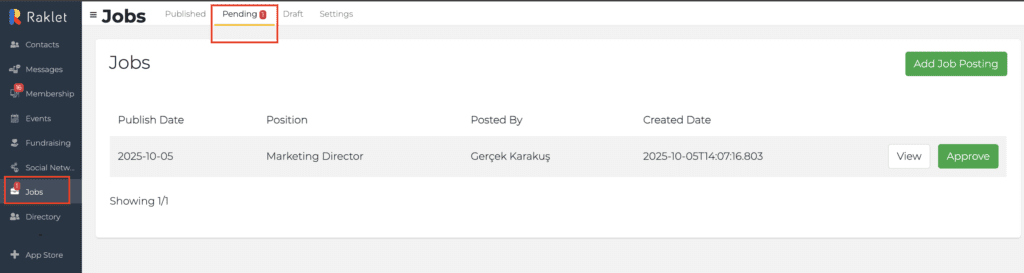
We’ve added a notification icon to help admins track pending job posts more easily.
When a member submits a job post, it now appears under Jobs → Pending with a notification indicator, making it easier for admins to notice, review, and approve pending jobs without missing anything.
7. Subscription Expiry for Paid Plans
Admins can now set a fixed expiry duration when creating paid subscriptions.
Just like free plans, you can define the subscription length in days and have the end date calculated automatically. This gives admins more control over subscription lifecycles and makes it easier to manage renewals, upgrades, and plan changes.
8. Manage Submember Emails for Corporate Memberships
Admins can now review and edit submember details in corporate membership applications before approval.
When a corporate member submits a group membership request, admins can check the listed submembers and update email addresses or member information if needed — such as fixing typos or removing accidental entries.
This ensures corporate memberships are approved with accurate and clean member data.
9. Edit Events Directly from the Listing Page
Admins can now edit events directly from the event listing page.
An Edit Event option has been added alongside Clone Event, allowing admins to make quick updates without opening the event detail page. This makes managing multiple events faster and more efficient.
10. Reactions for Comments
Users can now react to comments with likes.
A reaction option is available next to Reply, making it easier to acknowledge comments and engage in conversations without needing to respond.