
Last Updated: April 2026
Picking the wrong appointment scheduling software costs you more than money. You end up with a tool designed for 1:1 client bookings when you actually need class or event scheduling, or you pay for a full platform when a free tool would cover everything you need. This guide cuts through the noise: six honest reviews of the best appointment scheduling software for small businesses in 2026, a look at which free tools are worth using, where AI actually stands, and a decision guide to match the right tool to your business type.
What Is Appointment Scheduling Software? (and What It Isn’t)
Appointment scheduling software lets your clients book a specific time slot directly on your calendar without back-and-forth emails. You set your availability, they see open slots, they book one. The software handles confirmation emails, reminders, and calendar sync automatically.
This is different from general meeting tools like Zoom or Google Meet (which handle the video call, not the booking), and it is different from full membership management platforms that include scheduling as one feature among many. It is also distinct from class or event scheduling, where you create a session, set capacity, and let multiple people register. More on that distinction later.
For small business owners, the value is straightforward: fewer scheduling emails, fewer no-shows, and 24/7 booking availability even when you are not at your desk.

What to Look for in Appointment Scheduling Software
Here are the five dimensions that actually matter for a small business decision:
- Calendar sync quality. Two-way sync (where bookings appear on your Google or Outlook calendar and busy blocks from your calendar block your booking page) is essential. One-way or read-only sync creates double bookings. Confirm which calendars are supported before signing up.
- Automated reminders. SMS reminders reduce no-shows more effectively than email alone. Check whether the tool sends reminders via SMS or email only, and whether you can control the timing (24 hours before, 1 hour before, both).
- Payment at booking. Whether you need to collect a deposit, full payment, or nothing at booking depends on your business. Confirm which payment processors the tool supports and whether payment is available on the free plan.
- Team and multi-service support. If you have multiple staff members or offer multiple services, you need per-staff calendars, service menus, and buffer times between appointments. Some tools charge per booking page or per staff member, which changes the cost quickly at small-team scale.
- Integration with your existing tools. A scheduling tool that does not talk to your CRM, email platform, or membership software creates a separate data silo. Check native integrations first, then Zapier or Make as a fallback.
TL;DR: Quick Comparison Table
| Tool | Best for | Free plan | Starting price | AI features |
|---|---|---|---|---|
| Calendly | B2B, consultants, coaches | Yes (1 event type) | $10/mo (Essentials) | AI Routing Forms, AI Notetaker (beta) |
| Acuity Scheduling | Health, wellness, beauty | No | $16/mo (Emerging) | None |
| Square Appointments | In-person service + POS | Yes (individuals) | $29+/mo (teams) | None (scheduling-specific) |
| SimplyBook.me | International, multi-service | Yes (50 bookings/mo) | $9.90/mo (Basic) | None |
| YouCanBookMe | Teams, multi-staff | Yes (1 booking page) | $9/mo per profile | None |
| Setmore | Free multi-staff solution | Yes (4 users) | $5/mo per user (Premium) | None |
| HubSpot Meetings | Sales teams, CRM-connected booking | Yes (with free CRM) | Free | None |
| Cal.com | Developers, privacy-conscious teams | Yes | Free (cloud tier) | None |
| Google Calendar | Solopreneurs needing the simplest option | Yes | Free | None |
| Microsoft Bookings | Teams already on Microsoft 365 | With Microsoft 365 | Included in M365 | None |
The 6 Best Appointment Scheduling Software Tools in 2026
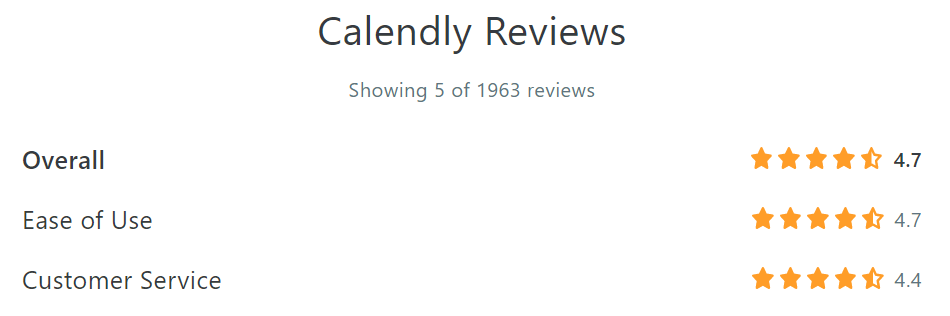
1. Calendly: Best for B2B and Service Businesses
Calendly is the most widely adopted scheduling tool for individual professionals and service businesses. You create event types (a 30-minute intro call, a 60-minute consultation, a 15-minute check-in), share your booking link, and Calendly handles the rest: calendar sync, confirmations, reminders, and time zone conversion.
Pricing: Free plan (1 event type, unlimited bookings); Essentials $10/month; Teams $16/month per user. The free plan is genuinely functional for solopreneurs, though Teams features require the paid tier.
AI features: Calendly is the only scheduling tool in this category that has shipped meaningful AI. AI Routing Forms qualify leads before they book by asking questions and directing them to the right event type or team member, reducing irrelevant bookings. AI Notetaker (currently in beta) records and transcribes meetings via Zoom or Google Meet and generates summaries. Both features are available on paid plans.
Best for: Consultants, coaches, sales teams, professional services firms, and anyone who does a high volume of B2B meetings and wants to qualify leads before they land on the calendar.
Limitations: Pricing jumps sharply at team scale: a 5-person team on Teams is $80/month. No built-in payment processing on the free plan. AI features are paid-only. If you need a booking page that looks deeply custom-branded, Calendly’s customization options are more limited than Acuity’s.
2. Acuity Scheduling: Best for Service-Based Small Businesses
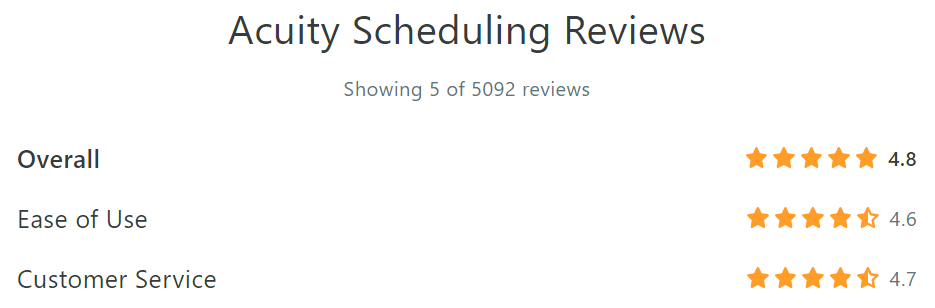
Acuity Scheduling (owned by Squarespace since 2019) is the most feature-complete option for service businesses that need strong client management alongside booking. It supports custom intake forms, packages and subscriptions, gift certificates, multiple service types, and detailed client records.
Pricing: No free plan. Emerging $16/month (1 staff calendar); Growing $27/month (up to 6 staff); Powerhouse $49/month (up to 36 staff). All plans include payment processing via Stripe, Square, or PayPal.
AI features: None disclosed since the Squarespace acquisition. The product has received incremental updates but no public AI roadmap. If long-term AI capability matters to your evaluation, treat this as a flag to check their current roadmap before committing.
Best for: Health and wellness practitioners, beauty professionals, tutors, therapists, and service businesses that need a professional booking experience with robust client records and intake forms.
Limitations: No free plan. Since the Squarespace acquisition in 2019, Acuity has not shipped the kind of product velocity Calendly has: no AI roadmap, no major calendar integration updates. Not ideal for purely online or virtual businesses where Calendly’s simpler interface is sufficient.
Note for healthcare providers: Acuity offers a HIPAA-compliant plan (Powerhouse tier). Calendly also has a HIPAA add-on for paid plans. Confirm current terms with each vendor before using either for patient bookings.
3. Square Appointments: Best for In-Person Service Businesses with POS
Square Appointments is the natural choice when your business takes in-person payments and you want scheduling and point-of-sale in one system. Booking, checkout, tip collection, and receipt are all handled without switching apps.
Pricing: Free for individual service providers (sole proprietors with no staff). Team Plus starts at $29/month for small teams. Square charges a standard processing fee on all payments.
AI features: None specific to scheduling. The broader Square ecosystem includes AI-driven fraud detection and inventory analytics, but these are platform-level features, not scheduling-specific ones.
Best for: Hair salons, barber shops, personal trainers, nail techs, massage therapists, and any in-person service business that already uses or would benefit from Square as its payment processor.
Limitations: Strong lock-in to the Square payments ecosystem. Not well-suited for virtual or online service businesses. If you already use a different POS or payment processor, the integration overhead reduces the value of choosing Square Appointments over a standalone scheduler.
4. SimplyBook.me: Best for International and Multi-Service Businesses
SimplyBook.me is the most configurable option on this list. It offers over 60 add-on features covering everything from intake forms and waiting lists to memberships, loyalty programs, and multi-location support. The interface supports 32 languages, making it the strongest choice for businesses serving international clients.
Pricing: Free plan (50 bookings/month, limited features); Basic $9.90/month; Standard $29.90/month; Premium $59.90/month. Add-ons stack on top of base pricing, so actual costs often exceed the headline number.
AI features: None identified. The product is actively developed and feature-rich, but no AI roadmap is publicly visible.
Best for: International businesses, salons and spas, fitness studios, and any business that needs deep customization: multiple locations, complex service menus, or advanced booking rules that simpler tools cannot accommodate.
Limitations: Feature overload is real for simple use cases. A freelancer setting up basic booking will encounter 60+ add-on options before completing onboarding. The add-on pricing model means actual monthly cost often exceeds the headline plan price once you enable the capabilities you need. The interface is less immediately intuitive than Calendly or Acuity.
5. YouCanBookMe: Best for Teams and Multi-Staff Booking
YouCanBookMe is built around team scheduling: round-robin assignment (distribute bookings evenly across staff), collective scheduling (find a time when multiple team members are free), and per-staff booking pages that work independently or as a team pool.
Pricing: Free plan (1 booking page, unlimited bookings); paid plans from $9/month per booking profile. Pricing is per profile, not per team, which affects cost projections for larger teams.
AI features: None identified.
Best for: Customer support teams, sales teams, small agencies, multi-practitioner health clinics, and any small business where clients should be able to book any available team member rather than a specific person.
Limitations: The booking page customization UI is visually denser than Calendly’s interface, with more options visible at once and less progressive disclosure. The per-profile pricing model can be harder to predict than per-user pricing. Integrations are good but not as extensive as Calendly’s ecosystem.
6. Setmore: Best Free Option for Small Teams
Setmore offers the most generous free plan of any scheduling tool reviewed here: up to 4 staff calendars, unlimited appointments, and video meeting links (via Zoom or Teleport), all at no cost. It is the right starting point for small teams that need multi-staff scheduling without a monthly bill.
Pricing: Free (up to 4 users, unlimited appointments); Premium $5/month per user (payment processing, SMS reminders, additional integrations). The free plan is not a bait-and-switch; most small teams can operate on it indefinitely.
AI features: None. No public AI roadmap visible.
Best for: Small service businesses, tutoring practices, wellness studios, and any team that needs a functional multi-staff scheduler and wants to avoid a monthly commitment while getting started.
Limitations: Fewer integrations than Calendly. Payment processing is a paid feature (you need Premium for Stripe/Square). The product is mature and stable but not developing as rapidly as Calendly.
Also worth considering: free tools with no separate subscription
The six tools above are the strongest options for small businesses that need a dedicated scheduling platform. If you are at an earlier stage or already using one of these platforms, the following free-tier options may cover your needs without an additional subscription.
- HubSpot Meetings (free). Included in HubSpot’s free CRM tier. Every booked meeting automatically creates a contact or deal record. The right choice for small sales teams or service businesses already using HubSpot who want booking linked to their CRM pipeline without an extra tool. See HubSpot Meetings
- Cal.com (free tier). Open-source scheduling with a generous free cloud tier and unlimited event types. Self-hostable for teams that want full data control. Best for technically comfortable teams or developers. See Cal.com
- Google Calendar Appointment Schedules. Built into every standard Google account. Create a booking page directly from Google Calendar and share the link with no third-party sign-up required. Very basic (no payment, limited reminder controls), but genuinely zero-cost and sufficient for solopreneurs who just need a bookable link.
- Microsoft Bookings. Included in Microsoft 365 Business Basic and higher subscriptions. Integrates natively with Outlook and Teams. The right default for businesses already on Microsoft 365 who do not want to pay for a separate scheduling tool.
AI in Scheduling Software: What’s Actually Useful in 2026
AI features in scheduling software are real but unevenly distributed. Here is an honest assessment of where things stand.
Calendly is the only tool in this category that has shipped meaningful AI. Routing Forms use AI to qualify leads before they book: a prospect answers a short intake questionnaire and gets directed to the right team member or event type (or told the fit is not right). This is genuinely useful for high-volume B2B booking flows. AI Notetaker, currently in beta, records and transcribes Zoom or Google Meet calls and generates summaries, reducing post-meeting admin work.
Acuity, Setmore, SimplyBook.me, YouCanBookMe, and Square Appointments have no disclosed AI features or public roadmaps in the scheduling layer as of 2026. The broader Square and Squarespace platforms have AI-adjacent analytics features, but these do not extend to the booking experience.
Google Workspace has Gemini integration for meeting scheduling, but this is an enterprise-tier feature and limited in scope for standard SMB plans.
Verdict for most small businesses: For the typical service business booking client appointments, AI adds no practical value to the booking flow in 2026. The fundamentals (automated reminders, 24/7 self-booking, two-way calendar sync) are what actually reduce no-shows and admin time, and none of those require AI. The exception is high-volume B2B lead qualification: if you book 50+ sales calls per week and need to screen prospects before they hit your calendar, Calendly’s Routing Forms are worth the paid plan.
Wait: Do You Actually Need Appointment Scheduling Software?
Before you sign up for any of the tools above, it is worth asking whether 1:1 appointment scheduling is actually what your business needs. Many organizations searching for “appointment scheduling software” are describing a different problem entirely.
If you run group classes or recurring events (a dance studio, yoga practice, nonprofit with weekly programming, community club with regular meetings, alumni group with events, or any membership organization where people sign up for sessions rather than booking individual time slots), you do not need appointment scheduling software. You need class and event scheduling: create a session, set capacity, let members register, send calendar invitations, check people in at the door.
Tools like Calendly and Acuity are built for individual bookings between two people. They do not have the concepts of session capacity, cloned recurring events, group check-in, or attendance reporting by member segment.
What to look for in a class and event scheduling tool instead:
- Recurring event templates so you can clone a weekly class with one click
- Ticket types and capacity limits per session
- Automatic calendar invitation generation for registered attendees
- QR code check-in for admins and staff at the door
- Integration with your member database so members register with their existing profile
- Attendance reporting: who showed up, no-show rates, engagement trends by member segment
Raklet is built for this use case. It is a membership management platform with event management software built in. Admins create recurring events with multiple ticket types, clone events in one click, and Raklet automatically generates calendar invitations and QR codes for each session. Staff check people in at the door using the QR scanner. AI-assisted content generation helps draft event descriptions and communications. Attendance and registration data feeds into member-level reporting so you can see which members are engaged and which are drifting.
If you manage a community, dance studio, club, nonprofit, association, or any gym and fitness studio with recurring class schedules and a member database, Raklet replaces both a separate scheduling tool and a separate membership platform.
For yoga and fitness studios specifically, see our yoga studio scheduling software guide for a deeper comparison of class-scheduling tools in that vertical.
If you need 1:1 client appointments (consultations, personal training sessions, salon visits, sales calls), the six tools reviewed above are the right category. Use this guide to choose among them.
How to Choose: Match the Tool to Your Business Type
Use this decision guide to narrow your options quickly:
- Service business (1:1 client appointments, professional services): Start with Calendly. If you need stronger client records or intake forms, consider Acuity.
- In-person service business with point-of-sale: Square Appointments. The payment integration is the differentiator.
- International business or high customization needs: SimplyBook.me. Be prepared for an add-on cost structure.
- Teams and multi-staff booking: YouCanBookMe for round-robin or collective booking; Calendly Teams or Setmore for simpler per-staff pages.
- Tightest budget or need a genuine free plan: Setmore (4 users free), Square (individuals free), HubSpot Meetings (free with CRM), Cal.com (free tier), or Google Calendar (no signup required).
- Already on Microsoft 365: Try Microsoft Bookings before paying for anything else.
- Group classes, recurring events, or membership organizations: Raklet. See the section above.
Frequently Asked Questions
Is Calendly free for small businesses?
Yes, Calendly has a free plan that includes one event type with unlimited bookings and basic calendar sync. It is functional for solopreneurs and freelancers. Teams features, AI Routing Forms, and payment processing require a paid plan starting at $10/month.
What is the best appointment scheduling software for a gym or yoga studio?
It depends on what you are scheduling. For 1:1 personal training sessions, Calendly or Acuity work well. For group fitness classes, recurring sessions, and member check-in, a class scheduling tool built for membership organizations (like Raklet) is a better fit than standard appointment scheduling software. See our yoga studio scheduling software comparison for a more detailed breakdown.
How do I reduce no-shows with scheduling software?
Automated reminders are the most effective lever. Most scheduling tools send an email confirmation immediately after booking; paid plans typically add SMS reminders 24 hours and 1 hour before the appointment. Requiring a deposit or full payment at booking also reduces no-shows significantly, since clients have a financial stake in attending. Calendly, Acuity, and Setmore Premium all support payment at booking.
What is the difference between appointment scheduling software and meeting scheduling tools?
Appointment scheduling software (Calendly, Acuity, Square Appointments) manages the booking process: clients see your availability, choose a slot, and receive a confirmation. Meeting tools like Zoom or Google Meet handle the video call itself. Most scheduling tools integrate with Zoom or Google Meet to generate a video link once a booking is made, but the two categories are distinct. You typically need both if you run virtual appointments.
Do I need separate scheduling software if I already use membership management software?
Not necessarily. If your membership management platform includes event and class scheduling (Raklet does), you may already have what you need for group sessions and recurring events. Adding a separate scheduling tool only makes sense if you need 1:1 client appointment booking that your membership platform does not support. Running two scheduling systems in parallel usually creates confusion for members and extra admin work for your team.
A Note for Membership-Based Organizations
If you manage a membership community (a club, nonprofit, dance studio, association, or any organization where scheduling is one part of a broader member experience), Raklet combines event management software with member profiles, dues, communications, and reporting in one platform. There is no separate scheduling tool to integrate or pay for. Start for free or explore Raklet’s event management features.