
✨ More Clarity, Control, and Workflow Improvements at Raklet ✨
At Raklet, we’re constantly working on improvements that make day-to-day community management smoother for admins and teams.
Many of these updates come directly from conversations with our customers: small friction points, questions from admins, or workflows that could be clearer and more intuitive.
This round of updates focuses on improving visibility, cleaning up admin panels, and making workflows more intuitive across the platform. From improved email tools and smarter filtering to enhancements in the Job Board and content management, these changes help organizations manage their communities with more confidence and less manual work.
As always, our goal is to keep refining the platform so that it stays simple, powerful, and reliable as your community grows. 🚀
✨ What’s New at Raklet?
Let’s take a look at the latest improvements.
See Which Links Members Click in Your Emails
You can now track which links your members click directly from Raklet emails.
With this update, admins can:
• See exactly which link was clicked in the email
• Understand what content members are engaging with
• Improve future email campaigns based on real engagement data
This makes it easier to understand which resources, events, or announcements your members care about most.
💡 Perfect for tracking engagement with things like:
- Event registrations
- Community pages
- Important announcements
- Member resources
Check out the video here to learn how to view these statistics.
Undo Sent Emails Within 30 Seconds
We’ve added a new Undo option for emails, giving admins a short window to cancel a message after clicking send.
With this update, once an email is sent:
• A message appears with a Cancel Sending button
• Admins can click it within 30 seconds
• The email is then removed from the queue before it goes out
This adds an extra layer of control and helps prevent mistakes when an email is sent too quickly.
It’s a small change that makes email sending feel safer, more flexible, and more forgiving for admins.
👉 Check out the Help Center article: How to Send Emails to Your Contacts in Messages?
New Filter: Next Reminder Date
We’ve added a new Next Reminder Date filter to help admins better track upcoming membership reminders.
With this update, you can now easily:
• Filter contacts based on their next scheduled reminder date
• Identify which members will receive reminder emails and when
• Quickly investigate situations where a reminder may not be expected
This makes it much easier for organizations to monitor reminder schedules and answer member questions about upcoming notifications.
You can find this filter under Contacts → Filters → Next Reminder Date.
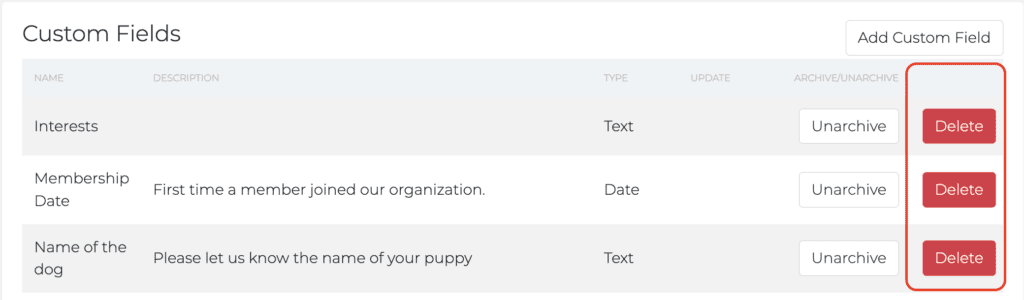
Remove Option for Custom Fields
Custom fields can now be fully removed from your workspace.
Previously, admins could archive custom fields, but archived fields would still remain visible in the list. This sometimes created confusion and made the settings page harder to manage.
With the new Remove option, admins can now:
• Permanently remove unused custom fields
• Keep their custom field list clean and organized
• Manage their field limits more effectively
Since custom field limits vary by plan, and can also be increased with add-ons, this update helps organizations better manage and optimize the fields they actively use.
👉 Check out to learn more: How to Manage Your Fields on Raklet?
Archive Function for Job Postings
We’ve introduced a new Archive feature for Job Board postings, making it easier to manage listings that are no longer active.
Previously, job postings could only be managed as Published, Pending, or Draft, which made it difficult to handle positions that were completed or paused without deleting them.
With the new update, admins can now:
• Archive job postings instead of deleting them
• Keep a record of why a job was archived
• Maintain a clean and organized job board
When archiving a job, admins are asked to select a reason such as:
- Position filled
- Not posted
- On hold
- Other (custom reason)
Archived jobs are automatically removed from active listings and moved to a new Archived tab, where admins can view details such as:
• Position
• Archived reason
• Archived date
• Archived by
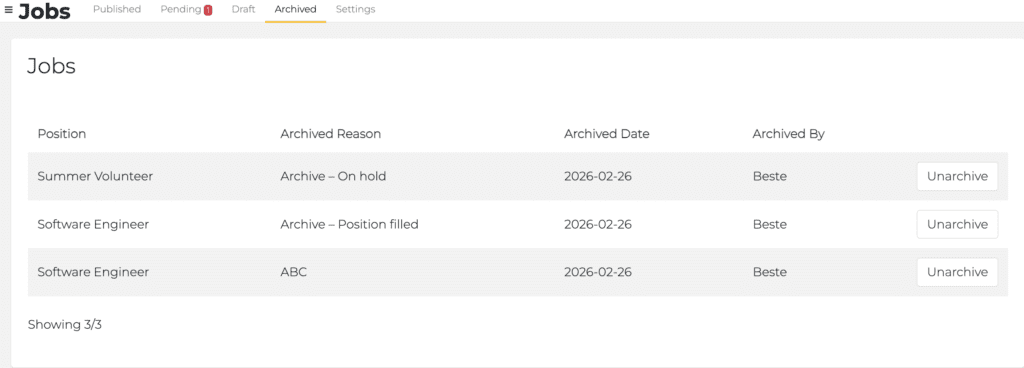
This improvement helps organizations maintain better records and keep their job boards up to date without losing historical information.
Improved Job Board Approval Workflow
We’ve improved the job approval workflow to make managing job submissions more intuitive for admins.
Previously, approving a job request required admins to click “Edit”, which was not always clear or expected when reviewing pending submissions.
With this update, the workflow has been improved so admins can more easily review and approve job postings without confusion.
This improvement helps admins:
• Navigate the job approval process more clearly
• Review pending submissions faster
• Manage job requests with a more intuitive workflow
These changes make the Job Board experience smoother and easier for administrators managing incoming job requests.